
Stronghold L66 Safe Lock Option
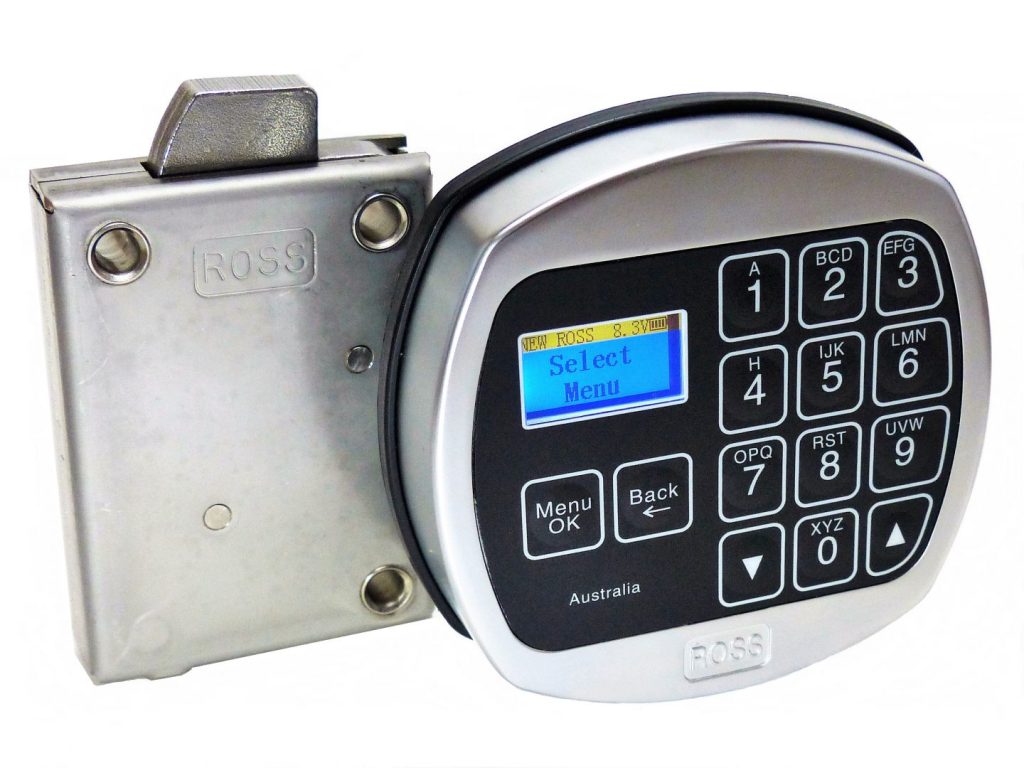
Stronghold L66 Safe Lock Option
The most comprehensive time-management option in the L-series — extending the premium features of the L22 with advanced Time-Lock scheduling, LCD Audit Trail upload, Duress alarm, Time-Delay, Dual-Mode and Multi-Door support.
Category: Safe Locks
Key Features
Advanced Time-Lock Scheduling
The most comprehensive time-management option in the L-series, with Timer and Timetable scheduling.
LCD Screen-Driven Menu
Built on an LCD screen-driven menu system, with an LCD Audit Trail upload facility.
Duress, Time-Delay & Dual-Mode
Duress alarm, Time-Delay, Dual-Mode and Multi-Door support.
Up to 30 Users + Super-Code
Supports up to 30 users (2 Managers + 28 Users) plus a Super-Code, and uses a 6-digit code length.
Extreme-Temperature Rated, Australian Made
Rated for extreme working temperatures (-25°C to +60°C), retrofit to the standard international footprint, Australian Made with an 18-month electronics warranty.
User Hierarchy
- User 1 & User 2: Managers (full administrative control)
- Users 3–30: Standard access users (28 user slots)
- Super-Code: emergency override code — also used to reset the Manager Code if forgotten
- Factory Reset: returns the lock to original factory settings
⚠️ The lock is distributed with a factory-set User 1 Manager Code. Change this code immediately on first use.
Basic Operation — Opening the Lock
ⓘ Instructions must be completed within 15 seconds, otherwise the system times out and the operation must be restarted.
Open Under Duress
The L66 includes a Duress interface facility. When activated, entering a configured duress code (or sequence) opens the lock normally for the threat actor while silently triggering an alarm or notification through the connected interface. Refer to the official Operating Instructions PDF for setup.
User Management (Manager Only)
All programming functions are driven by the on-keypad LCD menu. Always perform with the safe door open. Available functions:
- Set / reset the Manager Code
- Set / reset User Codes
- Disable / Enable a User Code (temporarily suspend access)
- Delete a single user · Delete ALL users
- Reset the Manager Code via Super-Code (emergency use)
- Factory Reset (returns the lock to default state)
Time-Lock & Operating Facilities (Manager Only)
The L66’s distinguishing features over the L22 are the Time-Lock and advanced facility menus, accessed through the LCD menu system:
Time-Lock (Timer / Timetable)
Set specific operating windows during which the safe can be opened — outside these windows, no code will open the lock. Useful for restricting access to business hours.
Time-Delay
Programmable waiting period between code entry and bolt release, to deter coercion and forced openings.
Duress Time-Delay
Separate time-delay rules for duress entries.
Dual-Mode
Requires two independent valid codes to open the safe (two-person rule).
Multi-Door Option
Control multiple lock bodies from a single entry pad / Manager profile.
LCD Audit Trail
View audit events on the screen, or upload the audit log to a PC for detailed monitoring.
Wrong Entry Penalty
- 4 consecutive invalid entries triggers a 4-minute lockout
- During lockout, the keypad will not respond to any entries — the countdown is shown on the LCD
- Wait for the lockout to clear, then re-enter a valid code
Power & Battery
- Battery: 1 × 9V Alkaline (Duracell or Energizer recommended)
- Battery life: approximately 1 year under normal use
- Static current: 50 µA · Power supply range: DC 4.5V – 12.0V · Low battery threshold: 5.2V
- Low-battery icon shown on the LCD — replace promptly
- Non-volatile memory: codes, settings and audit trail are retained during battery replacement
Key-Override / Mechanical Override
The L66 is supplied with a Swivel-Bolt as standard. Two override options are available:
- Key-Override (Swivel-Bolt only): 6 pick-resistant levers with restricted profile WAVE key (optional, supplied on request)
- Dead-Bolt lock body option: available, but key-override is NOT available with the Dead-Bolt version
Specifications
| Code length | 6 digits |
| User capacity | 30 (2 Managers + 28 Users) + Super-Code |
| Display | LCD screen with menu navigation |
| Audit Trail | LCD display + PC upload |
| Time-Lock | Timer and Timetable scheduling |
| Power | 1 × 9V Alkaline battery |
| Working Temperature | -25°C to +60°C |
| Working Humidity | <90% |
| Auto re-lock | 4 seconds |
| Wrong-try lockout | 4 minutes after 4 invalid attempts |
| Warranty | 18 months on the electronics |
| Origin | Australian Made, patented · retrofit footprint |